Text-based video editing without uploading your recording
Edit interviews, podcasts, and talking-head video by selecting transcript words while the recording, timeline, transcription, and export stay on your Mac.
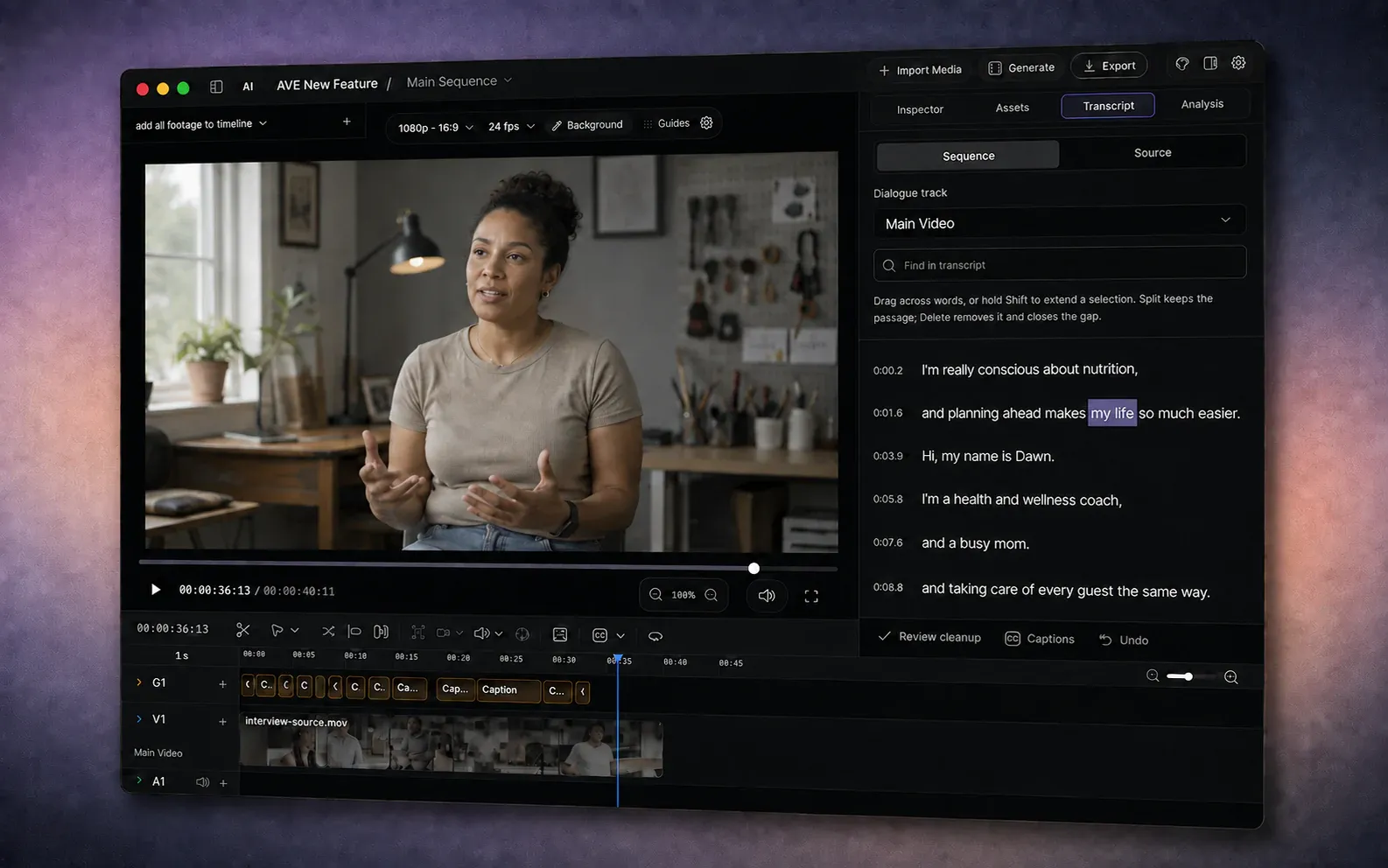
A transcript can be a very good editing interface.
If a video is built around speech, the first useful decisions are often textual: remove the repeated answer, keep the clearer explanation, split before the next idea, or pull one quote into a shorter sequence. Finding those moments by scrubbing a long waveform works, but it is a slow way to answer a language problem.
Text-based video editing connects each transcribed word to its place in the recording. Select a sentence and the editor knows which timed range you mean. You still have a real timeline, source media, video preview, and export at the end; the transcript simply becomes another precise way to work with them.
The awkward part is that many transcript editors begin by asking you to upload the recording.
The upload changes more than the waiting time
Uploading can be convenient when you want a browser workflow or remote collaboration. It also moves the footage across a boundary.
That matters for unreleased interviews, client work, internal presentations, customer research, legal recordings, health material, and any project covered by a confidentiality agreement. Even when the service is trustworthy, the editor still has to answer practical questions:
- Where is the original media stored?
- How long is it retained?
- Is it copied to another processor for transcription or AI features?
- What happens when the project or account is deleted?
- Can the work continue when the connection is slow or unavailable?
There is also the dull operational cost. A large recording has to leave the Mac before the first edit can begin, then a rendered result may need to come back. The longer the recording and the slower the upstream connection, the less “instant” the workflow feels.
Local transcript editing removes that dependency for the basic job. The file is already on the computer. The model can transcribe it there, and the editor can apply those timings directly to a local sequence.
What AVE does locally
In AVE 1.2.0, you can import a spoken audio or video recording and transcribe it on an Apple Silicon Mac. Pro and the seven-day Pro trial unlock the Transcript panel for text-based edits and speech cleanup.
The panel has two views:
- Source follows the original recording. It is useful for reading the full take and creating a separate sequence from one excerpt.
- Sequence follows the clips on a chosen dialogue track. It is where transcript selections can split or remove part of the current edit.
Drag across words, or hold Shift to extend a selection. Preview it before committing the change. Then choose the operation that matches the edit:
- Split cuts at the selection boundaries but keeps the passage.
- Delete removes the passage and closes the gap.
- Create sequence turns an excerpt into a separate editable sequence.
These are timeline edits. They do not delete or rewrite the original media file.
AVE can also collect possible cleanup edits for review. Set a pause threshold, inspect long gaps and timed filler words, preview the candidates, and select only the ones that help. The chosen cuts are applied together as one undoable edit. Nothing disappears merely because the software identified it.
Our step-by-step transcript editing guide covers the complete workflow, including Source versus Sequence, selection, cleanup, captions, and export.
A transcript is not the finished edit
Text makes dialogue structure easier to see. It does not hear the cut for you.
A sentence can look complete on the page while its final consonant overlaps the next breath. Removing every pause can make a thoughtful speaker sound anxious. Two clean excerpts can still produce a visual jump or an obvious change in room tone.
That is why the timeline and viewer remain important. After a text pass, play through every join. Widen any cut that sounds clipped. Keep pauses that carry intent. Cover a necessary visual jump with relevant footage where appropriate. Check captions after the dialogue is stable.
The useful division of labour is straightforward: use the transcript to make fast language decisions, then use the viewer, ears, and timeline to finish the edit.
Local does not have to mean isolated
Keeping the core workflow on the Mac does not prevent you from using external AI when it genuinely helps. AVE can connect optional model providers and external assistants for other tasks. Those requests follow the privacy and pricing terms of the provider you choose.
The distinction is choice. Importing a recording, transcribing it, selecting words, changing the timeline, and exporting the video do not require the footage to be uploaded to AVE. A connected cloud service is an optional boundary you cross deliberately, not the place every project has to begin.
That also changes the cost shape. Local transcription does not consume a vendor’s per-minute upload allowance. Your Mac performs the work on hardware you already own. AVE’s Free and Pro page explains which editor and transcript features are included in each plan; optional provider costs remain separate.
When this workflow fits
Text-based editing is strongest when speech carries the structure:
- interviews and customer stories;
- podcasts and video podcasts;
- tutorials, courses, and product walkthroughs;
- talking-head videos and presentations;
- pulling a short answer or quote from a long recording;
- reviewing pauses and filler words before a manual finishing pass.
It is less useful when the cut is driven mainly by movement, music, or visual continuity. A sports reel, montage, or narrative scene still needs decisions the transcript cannot represent. Even there, transcript editing can handle spoken sections while footage search and the timeline handle the rest.
Start with one real recording
The fastest way to judge the workflow is to use a recording you know well. Choose a short interview or presentation, transcribe it, remove one repeated sentence, preview the join, then create a separate sequence from one useful excerpt.
You will know quickly whether editing words feels more direct than hunting through the waveform.
AVE is available for Apple Silicon Macs. Download the current release, follow the transcript editing guide, or read more about the local-first editing boundary.